


A new café is opening near a station. A community group is proposing a pocket park. A theatre wants to show how its foyer could look after refurbishment. Each story would benefit from a strong visual, yet none of those future scenes exists to be photographed. That gap is where generated video can help, and where it can quietly damage trust.
The sensible role for H3 Video is illustration, not evidence. A generated clip can make an idea easier to picture, but it cannot prove that a shop has opened, a public space has been approved, or an event really happened. London organisations should decide which side of that line a clip belongs on before they write the prompt.

Start With A Claim That Needs No Fake Proof
Begin with the sentence the organisation is prepared to publish without a visual. “We plan to add outdoor seating if permission is granted” is a bounded statement. “This is how the new terrace will look” sounds like a record of a settled outcome. The difference is small on a planning document and enormous in a social feed, where many people will see the image before they read the qualifying text.
A useful brief separates three things: what is true now, what is proposed, and what is invented for the illustration. The true part may be an address, an announced date, or an approved design feature. The proposed part is the change being discussed. The invented part includes weather, crowds, camera movement, lighting, and any detail that was added only to make the clip watchable.
Write The Fact Before Imagining The Shot
Put the verified sentence at the top of the brief and do not let the prompt expand it. If a market will occupy one named square for an afternoon, the clip may illustrate the atmosphere of a small outdoor market. It should not add a road closure, a headline act, a packed crowd, or branded stalls unless those details are already confirmed.
This order keeps enthusiasm from becoming accidental misinformation. Creative decisions come after the factual boundary, so every extra object has to earn its place. The resulting prompt may be less cinematic, but it will be much easier for an editor, owner, or council partner to approve.
Mark Every Invented Detail Inside The Brief
Use a simple label such as “illustrative only” beside details that do not come from a real photograph or approved plan. That note belongs in the working brief as well as the published caption or surrounding copy. It helps a reviewer catch an invented shopfront, street sign, uniform, or landmark before the image leaves the organisation.
Keep the list short. If nearly every visible detail needs a disclaimer, the story probably needs a simpler scene. An abstract transition, a close view of a generic object, or a clean colour-and-shape sequence can explain an idea without pretending to show a specific London street.
Choose The Input That Reduces Reader Confusion
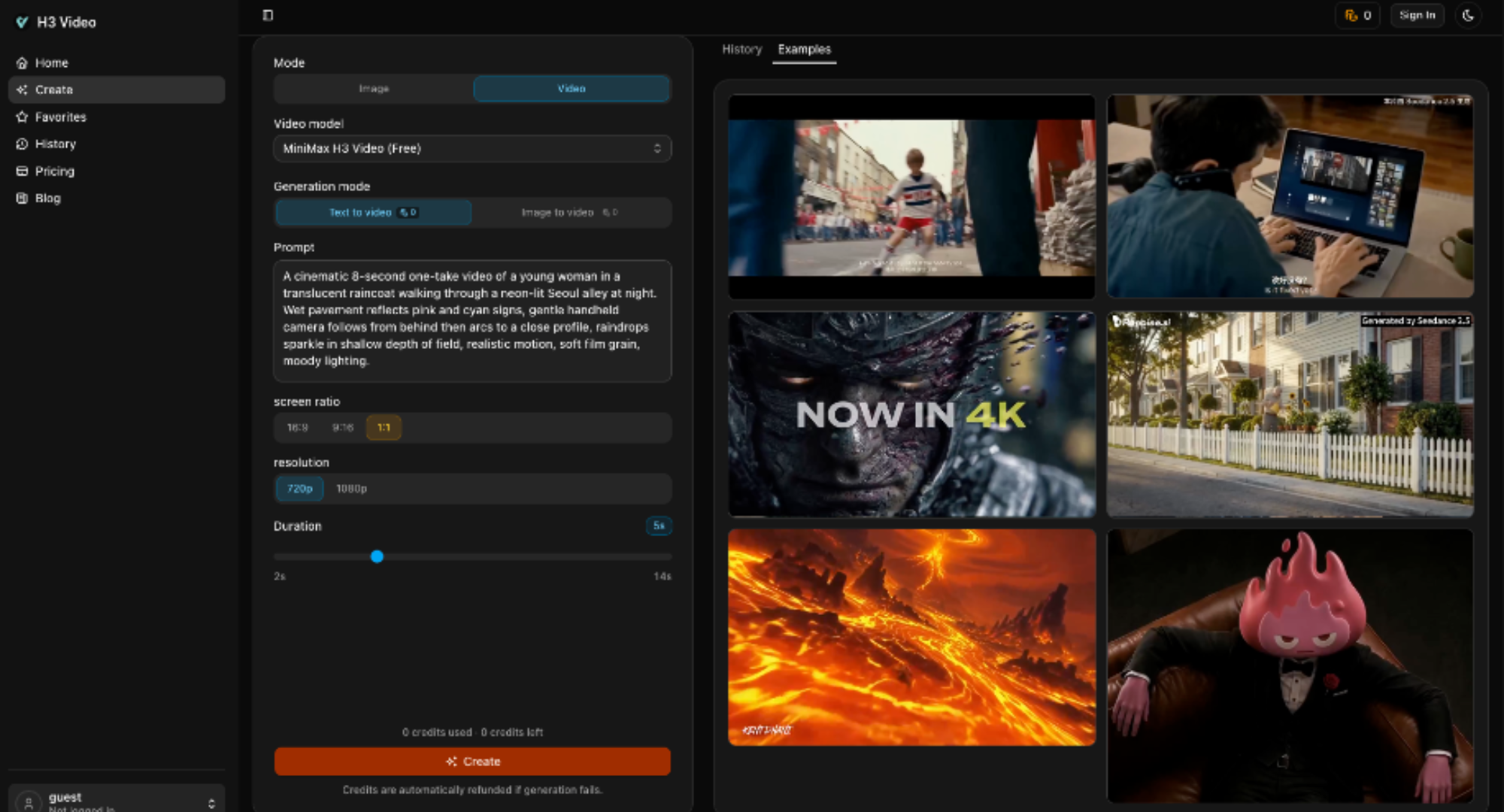
H3 Video offers Text to Video and Image to Video in the live workspace. That choice should follow the evidence available, not the desire for a more impressive result. Text is appropriate when the whole scene is knowingly illustrative. An image can help when an organisation owns a real source still and needs motion around it, but the source must be suitable for reuse, and the added movement still needs review.
Use Text For Ideas That Never Happened
Text to Video fits a future concept, an abstract service, or a mood that nobody could reasonably mistake for a record of an actual event. A financial adviser might illustrate the feeling of getting paperwork under control with a calm desk scene. A transport startup might show a generic parcel moving across a simplified city. Neither scene needs to impersonate a real customer or location.
Write the prompt around one visible action. “A stack of forms becomes one neat folder” is easier to assess than a sweeping story about a business transforming overnight. One action also leaves fewer openings for invented context to creep into the final clip.
Use Images Only With Permission And Context
Image to Video begins from a supplied still. That can be useful for a product photo, an approved architectural render, or an organisation-owned interior. It does not make every change truthful. A quiet room can become crowded, a blank wall can gain signs, or a fixed object can appear to move. Review the generated frames as new material, not as a harmless extension of the original photograph.
Do not feed in a news image merely because it is convenient. Ownership, consent, and the subject’s expectations still matter. If the source contains a person, private address, accident scene, protest, school, or medical setting, a conventional editorial image is usually the safer and clearer choice.
Review The Finished Frame At Feed Size
The visible generation panel includes 16:9, 9:16, and 1:1 screen ratios, together with resolution and duration controls. Choose the publishing surface before the prompt is approved. A wide clip may suit an article page or presentation, while a vertical clip is built for a phone feed. Reframing later can cut away the very detail that told viewers the scene was hypothetical.
A candidate from Minimax H3 Video should be reviewed at the size where the public will see it. Check whether the subject remains clear, whether the invented nature of the scene is obvious from the surrounding copy, and whether a small screen turns a restrained illustration into something that looks like eyewitness footage.
Before publishing, make one compact pass:
- Confirm that every factual detail matches the approved story.
- Remove faces, signs, landmarks, or brands that are not needed.
- Place the “generated illustration” label next to the clip.
- Check that the label survives reposting and a tighter crop.
This is not a bureaucratic burden. It is a way to keep the visual useful after it has been separated from the draft, reposted, or seen without the full article. Local stories travel through group chats and social feeds; context has to survive that journey.
Publish The Boundary Where Readers Can See It
Use H3 Video when a small business, charity, venue, or community team already knows what is confirmed and needs one supporting illustration. The tool can help people picture a proposal, service, or abstract change, but the organisation must supply the factual boundary. It is a poor fit for breaking news, public-safety claims, disputes, testimonials, or any story where viewers must judge what actually happened.
London audiences do not need every generated clip to be dull. They do need to know when they are looking at an idea rather than a record. Put that distinction in the brief, in the review, and beside the finished visual.







