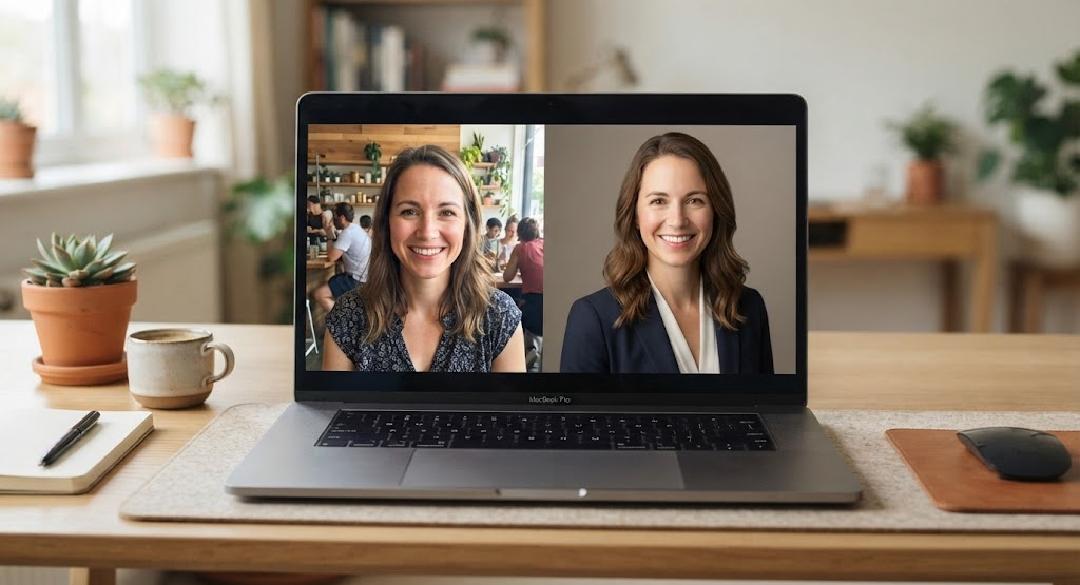

A useful Nano Banana Pro headshot prompt begins with a reference photograph and a clear idea of what may change. Better lighting and a quieter background might be welcome. A different jawline or a decade removed from the face probably isn’t what a professional profile needs.
The brief should describe an edit to a recognisable person. Treat an impressive result as a candidate to inspect, rather than assuming the model preserved every feature because the prompt asked it to. The final choice belongs to the person represented in the portrait.
Write a Nano Banana Pro headshot prompt around the reference
Nano Banana Pro is the name Google uses for Gemini 3 Pro Image, its image-generation and editing model. As well as Google’s own tools, it is offered by third-party access platforms that list Nano Banana Pro alongside other models. A reference-photo workflow gives the request a visible subject. For this task, begin with a recent image in which the face is clear and unobstructed, rather than asking text alone to describe your appearance.
Choose one photograph that carries the expression you want to keep. If the source has an uncertain smile or an awkward camera angle, decide whether a different source would solve the problem before requesting extensive reconstruction. Adding instructions cannot restore detail that the photograph never captured.
This is an illustrative editing brief, not a tested guarantee:
Edit the attached photograph into a professional head-and-shoulders portrait. Preserve this person’s facial proportions, apparent age, skin texture, hairstyle and expression. Use soft window-style lighting and a plain warm-grey background. Keep the existing clothes. Leave a little space above the head and around both shoulders. Avoid beauty retouching, added jewellery or changes to facial features. Return one portrait with no text.
The choice to keep existing clothes is deliberate. It limits the number of things being invented. If a different outfit is necessary, describe it as a separate change and inspect how the neckline, shoulders and hair meet the new fabric.
“Professional” is otherwise a vague direction. A therapist’s directory, an architect’s practice and a theatre programme may call for different levels of formality. Specify the visible qualities the portrait needs: relaxed expression, plain background, natural skin detail, or a particular crop. There is no need to invent a personality for the subject.
Avoid a pile of competing camera instructions. If you ask for flat, even lighting, dramatic shadows and a bright rim light in the same request, the intended appearance becomes harder to judge. Choose a lighting direction that suits the source and change it only if the result gives you a reason.
Choose the portrait before polishing it
Place the candidate beside the original photograph at roughly the same face size. Look at the features that make the person recognisable. Check the eye spacing, nose shape and jaw, then the hairline and any glasses. A portrait can be attractive while getting those details wrong.
Skin deserves a closer look. Excessive smoothing may erase freckles, fine lines or ordinary texture. If the result has changed the face, asking for “more realism” is too broad a correction. Name the change you want reversed and return to the original reference.
Do not keep regenerating simply because another version might be more flattering. Decide what counts as an acceptable likeness before browsing a long row of alternatives. Otherwise, selection can gradually favour a face that has drifted away from the person in the source.
Inspect the less prominent details as well. Glasses can have mismatched arms; earrings may differ; loose hair can blend into a collar. These are useful reasons to reject or repair a candidate even when the face looks convincing at thumbnail size.
If you want a second image-model option, OpenAI’s GPT Image 2 also supports image editing with reference inputs, and access platforms that offer GPT Image 2 make it easy to try alongside other models. Keep the same original photograph and the same brief when trying it. That makes differences easier to understand than sending the second tool an already altered portrait and asking it to improve everything again.
There is no basis here for declaring one model the universal winner for faces. The relevant output is the portrait in front of you. Ask the subject to review it, including any changes that are subtle enough for somebody else to overlook.
A portrait has to survive its final size
The full-size export is only one view of a headshot. Preview it in the place where it will actually appear. A portrait with generous breathing room can become cramped when a directory applies its own crop, while a dark jacket may merge into a dark background at a small size.
Keep the untouched source and the selected full-size result. Make delivery crops from that selected result so that revisions do not require rebuilding the portrait. Use filenames that distinguish the master from the square profile version or a wider biography-page image.
Read the destination’s image requirements before exporting. Pixel dimensions and file-size limits are properties of that destination, not universal headshot rules. A file that uploads successfully may still be cropped in an unsuitable way by the page template.
An edited portrait also represents a particular kind of image. Don’t describe it as an unaltered photograph if its setting or appearance has been generated. Where a publisher or employer has a policy on altered images, follow that policy rather than assuming that all professional directories use the same standard.
Save the Nano Banana Pro headshot prompt alongside the selected portrait and its original reference. Before replacing a public profile image, show the final crop to the person represented. They should recognise the expression and features, as well as approve the lighting and background.