

Businesses can improve their visibility a lot on Google Search by connecting their Google Business Profile to Google Ads. This integration will give businesses prominent placement at the top of relevant search results. They can maximise exposure to potential customers who actively search for related products or services.
Connecting a Google Business Profile with Paid Search campaigns improves presence in local search results. Google shows business profiles in its ‘local pack’ – a highly visible section at the top of search results. Small businesses get a real chance to compete with larger companies in their local market through this Google Ads strategy.
A consistent location and contact information through Google Business Profile ads gives customers a smooth path to make purchases. The integration syncs campaign performance and encourages a unified digital marketing strategy across platforms. Location assets make ads show important business details like address and phone number. This helps nearby customers find the business easily.
This piece will show how businesses can combine these powerful Google tools effectively. You’ll learn the step-by-step process for integration and proven strategies to maximise online visibility and conversion potential.
Why Combine Google Ads and Google Business
Combining Google Ads with Google Business Profile creates powerful synergies that businesses can’t ignore. This integration is the lifeblood of an effective Google Ads strategy that gives multiple competitive advantages.
Boosting visibility in local search results
A business’s presence in local search results improves significantly when Google Business Profile connects with Google Ads. Businesses show up in Google’s highly visible “local pack” at the top of search results whenever potential customers look for related products or services nearby. They gain multiple touchpoints with potential customers by appearing in both sponsored listings and map results.
Statistics show that 42% of local searchers click into map pack results. Location-based assets through this integration let ads display critical information like business address, map location, and distance details. This makes it much easier for customers to find physical locations.
Creating a unified brand presence across platforms
A cohesive brand identity emerges across Google’s ecosystem when these platforms link together. Audiences recognise the brand easily wherever they find it, which reduces confusion.
Google Business Profile adds credibility as a powerful trust signal when linked to Google Ads. Users who click on ads land on detailed business listings. These listings contain essential information such as contact details, hours, and real customer reviews.
How this integration supports small business growth
Small businesses with tight marketing budgets find this combination a valuable Google Ads strategy for small business growth. They can focus advertising spend on potential customers within specific service areas through precise geographic targeting.
A “triple exposure” effect emerges from this integration as businesses appear in:
- Google Ads sections at the top of the results
- Local map pack listings
- Organic search results
Trust builds through repeated exposure with this layered visibility approach that maximises ROI. Small businesses gain a stronger overall presence. They look more established and trustworthy than competitors who might only show up in one section of search results.
How to Link Google Business Profile to Google Ads
Image Source: sKampakis
Connecting your Google Business Profile to Google Ads plays a vital role in an effective Google Ads strategy. This simple process lets businesses show their location details right in their ads, which helps them get noticed and connect with more customers.
Step-by-step setup process
You need to follow these specific steps to connect these two powerful Google tools:
- Access the Assets section within the Campaigns menu in Google Ads
- Click the plus button, then select “Location”
- Choose “Our locations” and select “Continue”
- Select one of three connection methods:
- Link to any Business Profile (enter your domain to find profiles)
- Link to a Business Profile you manage (select from dropdown)
- Request access to another Business Profile (provide email address)
- Apply any desired filters by business name or label
- Review and confirm your selection
Google needs about 24 hours to sync both accounts completely. Any changes you make to your business information in Business Profile might not show up right away in Google Ads during this time.
Using location assets effectively
The connection between accounts lets your ads display important details like your business address, maps, distance information, and merchant photos from your Business Profile. These visual elements help your ads stand out and get more clicks.
The quickest way to build a strong Google Ads strategy for a small business is to combine location assets with site link extensions and call extensions. This powerful mix creates a strong online presence that brings in both website visitors and store customers.
Location assets connect your online ads with your physical store. Your Business Profile’s merchant photos help customers recognise your brand easily across all platforms.
Common setup mistakes to avoid
Watch out for these issues that could cause problems with the linking process:
The biggest problem comes from inconsistent account access. Make sure whoever sets up Google Ads has the right access to the Business Profile manager account or can easily reach the profile manager.
Wrong or missing business details can stop the connection from working properly. Keep your business names under 80 characters, include street addresses, and make sure URLs don’t go over 35 characters.
Account-level location asset filters need careful handling. Changes might delete feed items that don’t match the new filter criteria. Adding Google Ads labels to listings can trigger a resync and create duplicate information.
Key Benefits of Integration
Image Source: How Many Cups in a Quart
Google Business Profile’s integration with Google Ads offers unique performance benefits that boost a comprehensive Google Ads strategy. Businesses can achieve operational efficiencies they couldn’t get by managing these platforms separately.
Improved ad relevance and quality score
The connection between these platforms affects Quality Score – Google’s 1-10 rating system that evaluates how relevant and useful ads are. Business information flows into advertisements through this integration, which makes ads more relevant. Quality Score has three main elements: Expected CTR, Ad Relevance, and Landing Page Experience. The first and third elements carry slightly more weight.
Better Quality Scores bring real benefits. Advertisers pay less per click and get better ad positions. This strategic connection helps businesses advertise more economically.
Increased trust through reviews and ratings
Customer reviews showing directly in advertisements might be this integration’s most valuable feature. Text ads with shop ratings see a 2% average improvement in click-through rate. Some sources suggest these increases could reach 17%.
The numbers tell a compelling story about consumer behaviour. About 95% of shoppers read online reviews before buying. Even more interesting, 79% trust these reviews as much as recommendations from people they know. Some studies show that displaying reviews can boost conversion rates up to 270%.
Higher conversion rates from local traffic
The integration enables location assets that show vital business details like address, maps, and distance information. Small businesses find this feature especially valuable when implementing their Google Ads strategy for small businesses.
The results speak for themselves. Google Business Profile ads converted 30% better than standard search ads in client case studies. These features work together smoothly to create better customer experiences while providing useful marketing insights.
Streamlined campaign updates and management
Business information updates in Google Business Profile automatically flow to Google Ads campaigns once the accounts connect. Advertisers don’t need to manually update multiple platforms to keep their ads current.
Managing everything in one place saves time and keeps brand messaging consistent throughout the customer experience. This efficiency becomes more valuable as marketing activities grow, making it essential to implement the best Google Ads strategy.
Optimising for Maximum Exposure
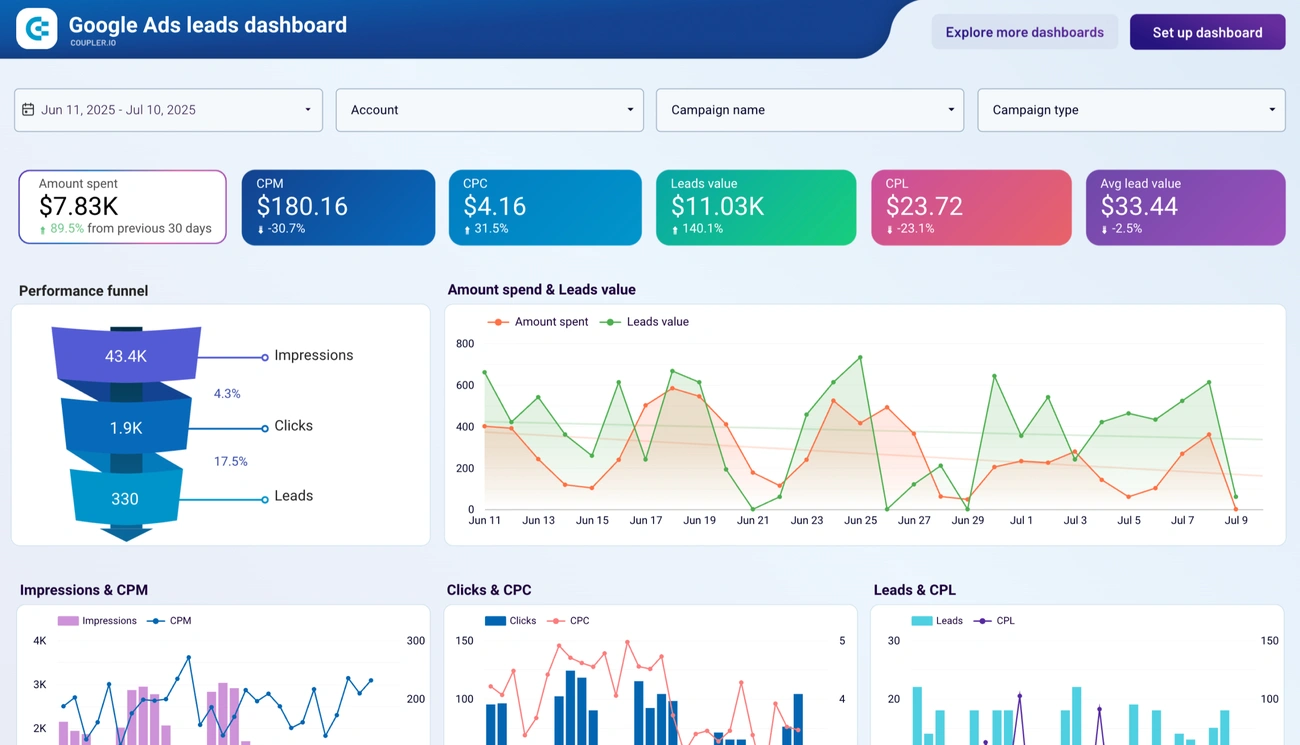
Image Source: Coupler.io
Google Ads and Google Business Profile integration needs informed refinement and regular monitoring. This approach helps businesses of all sizes get maximum exposure.
Using data to refine your Google Ads strategy
The foundations of a good Google Ads strategy rest on tracking key performance metrics. Businesses should keep an eye on:
- Local search traffic through Google Analytics, broken down by location
- Google Ads performance metrics like impressions, clicks, and conversions
- Google Business Profile insights, including search queries and user actions
Regular performance checks help businesses make smart decisions about ongoing optimisation. The data lets them target specific geographic areas and focus advertising budgets on potential customers within service areas.
Running A/B tests for better performance
Target audiences respond differently to various elements, and A/B testing shows what appeals to them best. Businesses should set clear goals and hypotheses before starting tests. The A/B testing process should:
- Focus on one element at a time (headline, image, or call-to-action) to see its effect
- Run long enough to collect useful data (2-4 weeks recommended)
- Look at the results carefully before making changes
Market conditions and audience priorities change all the time. A/B testing should continue even for campaigns that have been running for a while.
Leveraging mobile optimisation for local reach
Mobile devices power many “near me” searches. Everything in the Google Ads strategy for a small business must focus on mobile users. Mobile optimisation needs:
Smart use of ad assets like location extensions (showing maps and addresses) and call extensions (increasing click-through rates by 4-5%). Compelling headlines with strong calls-to-action work best for mobile users. Mobile landing pages should match ad content for a smooth user experience.
Tracking conversions and ROI
The best Google Ads strategy measures return on investment regularly. ROI measurement reveals how advertising efforts affect business profits. Good conversion tracking helps businesses:
Find the keywords, ads, and campaigns that create valuable customer activity. Smart Bidding strategies can automatically optimise campaigns based on business goals. Once conversion data is set up, automated bidding adjusts bids live to hit specific targets.
Conclusion
Google Ads and Google Business Profile work together as a winning combination to boost your online visibility. This powerful duo creates multiple ways for potential customers to find you through sponsored listings, map results, and organic search at the same time. Small businesses can compete with larger companies by focusing their ad spending on specific geographic areas.
The process to link these accounts is simple but needs careful attention and proper access rights. After setup, the benefits become clear quickly. Your quality scores get better through improved ad relevance. Customer reviews help build trust, and location-specific details boost conversion rates. The automatic sync between platforms makes campaign management a breeze.
Success depends on smart use of data. You need to watch your performance numbers, run A/B tests, put mobile users first, and track conversions properly. These steps help you get the most from your ad budget and make things better for your users.
Without doubt, businesses that blend these tools gain an edge in today’s digital world. These Google tools work together to create a strong online presence that helps customers find what they need. This approach should be the lifeblood of any detailed digital marketing plan to improve visibility, build trust, and propel development.







